Computer Vision Syndrome: What It Is, Why It Happens, and How to Ease It

Updated: 2 days ago
Medically reviewed by Dr. Baraa Alnahhal, MD · Last reviewed: October 17, 2026
Quick Answer
Computer vision syndrome is a group of eye and body issues caused by using digital devices for several hours without breaks [5]. It is not serious and does not cause permanent damage [5]. Symptoms include eye irritation, blurry vision, light sensitivity and a stiff neck [5]. Treatment involves managing dry eyes, correcting vision problems and following the 20-20-20 rule [5].
What the research says
Screen-related eye strain is very common. According to PubMed, a meta-analysis of 103 cross-sectional studies with 66,577 participants found a pooled prevalence of computer vision syndrome of 69.0% (95% CI 62.3 to 75.3), ranging from 12.1% to 97.3% across studies. Prevalence was higher in women than men (71.4% vs 61.8%) (Ccami-Bernal et al., Journal of Optometry, 2024 [1]).
Reduced blinking and dry-eye-like symptoms are central, and environment changes, artificial tears, blinking exercises and near-work breaks are the most studied treatments. A 2024 review reports that ocular surface symptoms are tied to decreased blink frequency, and that prevalence ranges from 8.2% to 100% depending on who is studied and how (Pucker et al., Clinical Optometry, 2024 [2]).
The exact numbers in the 20-20-20 rule have limited evidence. In a lab study of 30 young adults doing a 40-minute tablet reading task, 20-second breaks every 5, 10, 20 or 40 minutes did not significantly change symptoms (P = .70). Symptoms rose after every session, so regular breaks remain a common recommendation while better evidence is gathered (Johnson and Rosenfield, Optometry and Vision Science, 2023 [3]).
Study details are from PubMed abstracts.
Key Terms, Defined Simply
Term | Plain-Language Meaning |
Computer vision syndrome (CVS) | Eye and body strain from long stretches of screen use without breaks |
Digital eye strain | Another name for computer vision syndrome |
Pixels | The tiny dots that make up the text and images on your screen |
Refractive error | A vision problem like nearsightedness that keeps light from focusing properly on the retina |
Photophobia | Sensitivity to light |
Ergonomics | Setting up your workspace so your body stays comfortable and avoids strain |
20-20-20 rule | Every 20 minutes, look at something at least 20 feet away for about 20 seconds |
What Is Computer Vision Syndrome?
Computer vision syndrome (CVS), also called digital eye strain, refers to the issues you may develop when you use digital devices for several hours without taking a break [5] [6]. Computers, tablets, e-readers, and smartphones are all examples of these devices.
Hours of nonstop screen time can lead to irritated eyes, blurry vision, and headaches [5] [6]. Research also shows that nighttime use of digital devices can affect your sleep [5].
Computer vision syndrome is not a serious medical issue [5]. But its symptoms may be so uncomfortable that they affect your work or daily routine [5].

What Are the Symptoms?
Vision issues are the most common symptoms. They include eye irritation, blurry vision, and sensitivity to light [5].
Straining to see a computer screen or any digital device screen can also cause aches and pain behind your eyes. And it can make your neck, shoulders, and back feel stiff and sore [5].
Symptom Category | What You May Notice |
Eye symptoms | Irritation, dryness, aches and pain behind the eyes |
Vision symptoms | Blurry vision, sensitivity to light |
Body symptoms | Stiffness and soreness in the neck, shoulders, and back |
Sleep-related | Nighttime device use can affect sleep |
What Causes Computer Vision Syndrome?
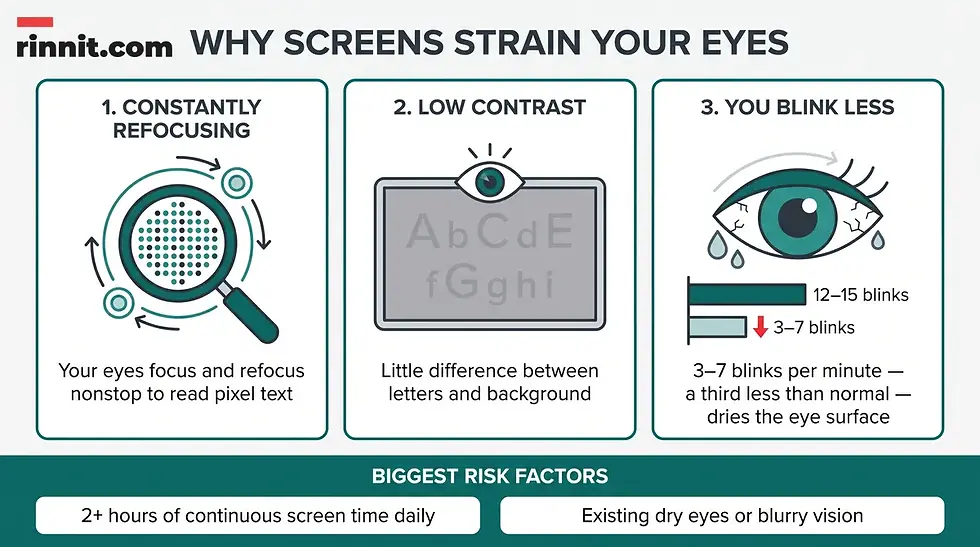
Time spent looking at digital screens causes CVS. You can get eye strain from reading a printed page, but screens add another layer of strain because of three factors [5].
Constantly refocusing. Pixels — tiny dots — make up the print you see on computer and device screens [5]. You do not realize it, but you are constantly focusing and refocusing your eyes to see the print. All that movement strains your eyes.
Screen contrast levels. Your eyes work hard to read letters on a digital screen because there is usually a low contrast level between the letters you see and the background [5] [6].
You blink less. You blink three to seven times a minute when you look at a screen — about a third less often than normal [5]. You may also not close your eyes all the way when focusing on a screen. Blinking moistens your eyes, so blinking less dries the surface of your eyes [2]. This is probably the most treatable cause of computer vision syndrome.
Screen Strain Factor | Why It Tires Your Eyes |
Constantly refocusing | Pixels force your eyes to focus and refocus nonstop to read the text |
Low screen contrast | Little difference between letters and background makes eyes work harder |
Reduced blinking | 3–7 blinks per minute (a third less than normal) dries the eye surface |
Who Is at Risk?
The most significant risk factor is time spent using computers and other devices. Two hours of continuous digital screen time daily increases the chance you will develop computer vision syndrome [5] [6].
You may have more noticeable symptoms if you have dry eyes or eye conditions that cause blurry vision [5].
How Is Computer Vision Syndrome Diagnosed?
An eye care specialist will do an eye exam. They will ask about your eye health, such as whether you know you have an issue like nearsightedness. They may also ask if family members have eye diseases or vision issues [5].
They will ask about your daily routine too. For example, they may ask whether you look at computer screens or other digital screens for hours at a time for work or recreation — including gaming [5].
How Is Digital Eye Strain Treated?
Treatment typically involves managing dry eyes and correcting any vision issues [5].
Managing dry eye. Your provider may suggest you make a conscious effort to blink your eyes more often, because blinking encourages tears that moisten your eyes [2] [5]. They may also recommend over-the-counter or prescription eye drops [5].
Correcting vision issues. Your symptoms may be worse if you have a refractive error. An eye care specialist may recommend glasses or contact lenses [5] [6].
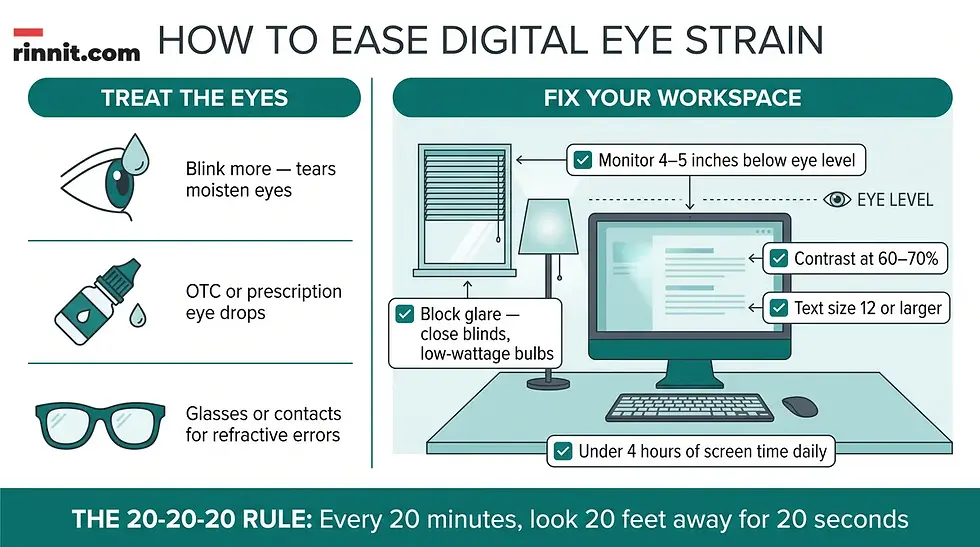
Changing your workspace and computer use is another way to manage computer vision syndrome [5]. The table below summarizes the suggestions.
Workspace Change | What to Do |
Adjust your viewing angle | Place your display about 4 to 5 inches below eye level — you are more comfortable looking down on your screen |
Block glare | Close curtains, lower window blinds, avoid bright overhead lights, and use low-wattage light bulbs |
Re-think your workspace | Let ergonomics guide your setup to reduce eye fatigue and back and neck pain |
Reduce your screen time | If possible, use digital devices for fewer than four hours per day |
Take more breaks | Build in a 15-minute break every two hours; use the 20-20-20 method (every 20 minutes, look at something 20 feet away for 20 seconds) |
Adjust your contrast | Set screen contrast between 60% and 70% |
Boost text size | Zoom in if your font is not at least size 12; read dark print on a light background |
When Should I Seek Care?
See an eye care specialist once a year, even if you do not have vision issues [5] [6]. But do not wait for your regular appointment if you have new symptoms of computer vision syndrome, or if symptoms get worse even while you are doing things to reduce eye strain [5].
What is the bottom line on computer vision syndrome?
Computer vision syndrome is your eyes and body telling you that long stretches of screen time need breaks. The condition is uncomfortable but not dangerous, and it does not cause permanent damage. Small, consistent changes — blinking more, adjusting your screen height and contrast, enlarging your text, and practicing the 20-20-20 rule — can ease symptoms, and the syndrome can go away when you change your routine.
A comforting note for heavy screen users: The syndrome doesn't do permanent damage. You don't have to give up your digital devices. Just try building regular screen breaks into your schedule.
Get the specialized care your eyes need. A yearly exam with an eye care specialist is smart even if your vision feels fine. Schedule one if you spend two or more hours a day on screens.
For more plain-English health guides like this one, visit Rinnit.com.
Frequently Asked Questions
What is computer vision syndrome?
Computer vision syndrome (CVS), also called digital eye strain, refers to eye and body issues that happen when you use digital devices like computers, tablets, e-readers, and smartphones for several hours without taking a break.
What is another name for computer vision syndrome?
Digital eye strain.
Is computer vision syndrome a serious medical issue?
No. It is not a serious medical issue, but its symptoms can be uncomfortable enough to affect your work or daily routine.
Can computer vision syndrome cause permanent damage?
No. The syndrome does not do permanent damage, though it can strain your eyes, neck, and shoulders.
What are the most common symptoms of computer vision syndrome?
The most common are vision issues: eye irritation, blurry vision, and sensitivity to light.
Can computer vision syndrome cause body pain?
Yes. Straining to see screens can cause aches and pain behind your eyes and make your neck, shoulders, and back feel stiff and sore.
Can computer vision syndrome affect sleep?
Research shows nighttime use of digital devices can affect your sleep.
What causes computer vision syndrome?
Time spent looking at digital screens causes CVS, with three screen-specific factors adding strain: constantly refocusing on pixels, low contrast between text and background, and blinking less often.
Why do screens strain my eyes more than printed pages?
Pixels force your eyes to constantly focus and refocus, low letter-to-background contrast makes reading harder, and you blink only three to seven times a minute at a screen — about a third less than normal, which dries the eye surface.
What are pixels and why do they matter for eye strain?
Pixels are the tiny dots that make up the text and images on your screen. Your eyes unconsciously focus and refocus on them to read, and all that movement strains your eyes.
How much screen time raises my risk of computer vision syndrome?
Two hours of continuous digital screen time daily increases your chance of developing CVS. Time spent using devices is the most significant risk factor.
Who is more likely to notice symptoms?
People who have dry eyes or eye conditions that cause blurry vision may have more noticeable symptoms.
How is computer vision syndrome diagnosed?
An eye care specialist performs an eye exam and asks about your eye health, family history of eye disease, and daily screen habits, including hours at a time spent on screens for work or recreation.
How is computer vision syndrome treated?
Treatment typically involves managing dry eyes (blinking more often and using over-the-counter or prescription eye drops) and correcting vision issues with glasses or contact lenses.
Why does blinking more help computer vision syndrome?
Blinking encourages tears that moisten your eyes, and reduced blinking is probably the most treatable cause of computer vision syndrome.
What is the 20-20-20 rule?
Every 20 minutes, look at something at least 20 feet away for about 20 seconds to give your eyes a break from your computer screen.
How often should I take breaks from my screen?
Build in a 15-minute break every two hours, plus the 20-20-20 rule throughout your workday.
Where should I place my computer monitor?
About 4 to 5 inches below eye level, since you are more comfortable when you look down on your screen.
How can I reduce screen glare?
Close curtains, lower window blinds, avoid bright overhead lights, and use low-wattage light bulbs, because light from windows or lamps that reflects on your screen can strain your eyes.
What screen contrast setting helps reduce eye strain?
Setting screen contrast between 60% and 70% may ease eye strain.
What text size should I use on screens?
Zoom in if you are reading screen content in a font that is not at least size 12, and read dark print on a light background.
What is screen contrast?
Screen contrast is the difference between the lightest and darkest parts of things you see on your monitor.
Can glasses or contact lenses help computer vision syndrome?
Yes — your symptoms may be worse if you have a refractive error, so an eye care specialist may recommend glasses or contact lenses.
Does computer vision syndrome go away?
Computer vision syndrome can, especially if you change your routine to reduce your risk. If your job requires computer use, ask a healthcare provider about managing your risk in the long term.
Do I have to give up my devices to stop computer vision syndrome?
No. You do not have to give up your digital devices — just try building regular screen breaks into your schedule.
How often should I see an eye care specialist?
Once a year, even if you do not have vision issues.
When should I see a specialist sooner than my yearly appointment?
If you have new symptoms of computer vision syndrome, or symptoms that get worse even while doing things to reduce eye strain.
What is a refractive error?
A vision problem, such as nearsightedness, in which the eye does not bend (refract) light correctly, making vision blurry without correction.
What is eye irritation?
A common CVS symptom — an uncomfortable, dry, or gritty feeling in the eyes.
What is photophobia?
Sensitivity to light, one of the most common symptoms of computer vision syndrome.
Can gaming cause computer vision syndrome?
Yes — spending hours at a time looking at screens for work or recreation, including gaming, is part of what eye care specialists ask about.
What role do eye drops play in treating CVS?
Over-the-counter or prescription eye drops can help manage dry eye, one of the main treatment targets for computer vision syndrome.
Can computer vision syndrome affect my work?
Yes — while not dangerous, symptoms may be uncomfortable enough to affect your work or daily routine.
How can I make long screen days easier on my body?
Place the monitor 4 to 5 inches below eye level, block glare, use ergonomic workspace setup, limit screen time to under four hours a day if possible, take breaks, set contrast to 60–70%, and enlarge text to at least size 12.
Related Reading
References
Ccami-Bernal F, et al. Prevalence of computer vision syndrome: A systematic review and meta-analysis. J Optom. 2024;17(1):100482. PMID 37866176. https://doi.org/10.1016/j.optom.2023.100482
Pucker AD, et al. Digital Eye Strain: Updated Perspectives. Clin Optom (Auckl). 2024;16:233-246. PMID 39308959. https://doi.org/10.2147/OPTO.S412382
Johnson S, et al. 20-20-20 Rule: Are These Numbers Justified? Optom Vis Sci. 2023;100(1):52-56. PMID 36473088. https://doi.org/10.1097/OPX.0000000000001971
Kaur K, et al. Digital Eye Strain- A Comprehensive Review. Ophthalmol Ther. 2022;11(5):1655-1680. PMID 35809192. https://doi.org/10.1007/s40123-022-00540-9
Cleveland Clinic. Computer Vision Syndrome (Digital Eye Strain): What It Is. Cleveland Clinic. Last updated December 19, 2025. https://my.clevelandclinic.org/health/diseases/24802-computer-vision-syndrome
American Optometric Association. Computer vision syndrome. American Optometric Association. Accessed October 15, 2026. https://www.aoa.org/healthy-eyes/eye-and-vision-conditions/computer-vision-syndrome
Medical Disclaimer
This article is for general informational purposes only and is not a substitute for professional medical advice, diagnosis, or treatment. Always seek the advice of your healthcare provider with any questions you may have regarding a medical condition. Never disregard professional medical advice or delay seeking it because of something you have read here. In a medical emergency, seek emergency care immediately.



Comments